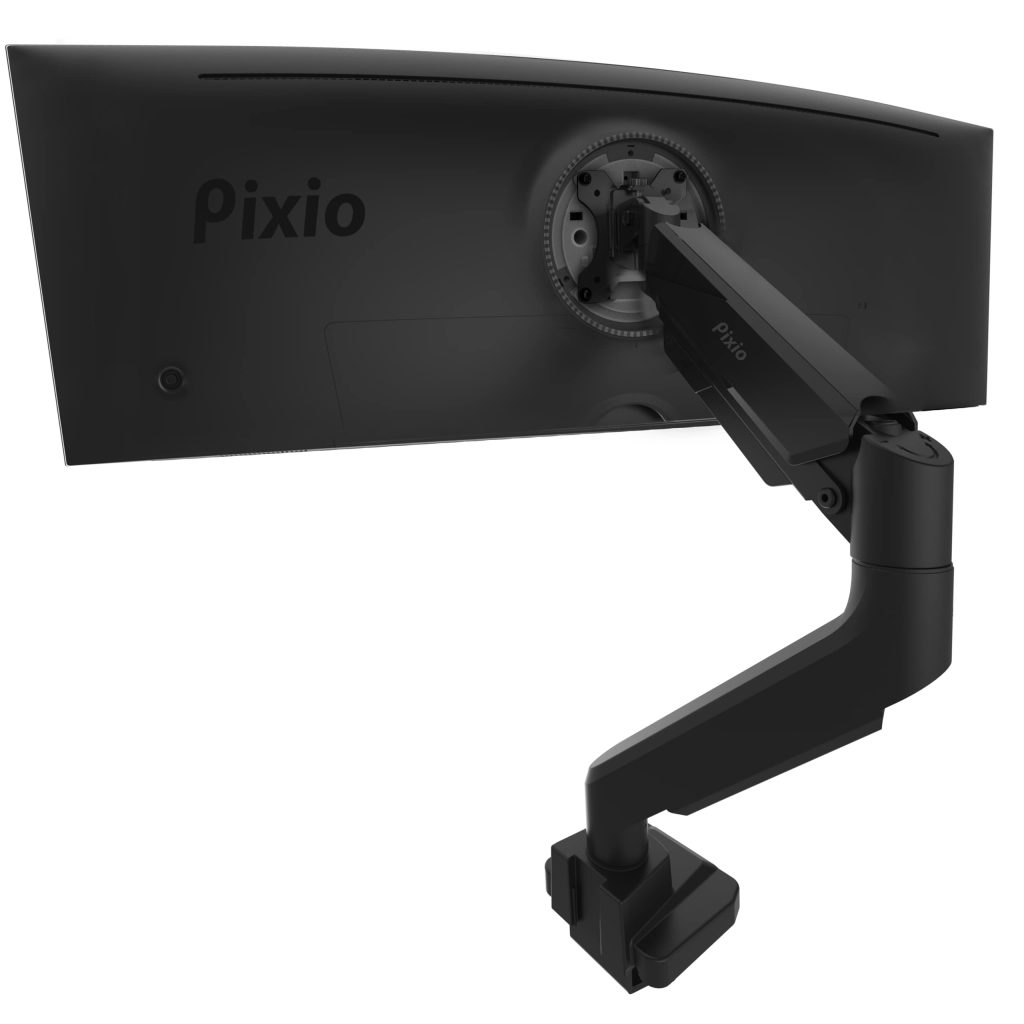
The Pixio PS2S is a single monitor arm built for the large end of the desk-display spectrum. It is rated for flat panels up to 49 inches and 39 pounds, or curved panels up to 31 pounds, and it supports the standard VESA 75x75mm and 100x100mm patterns. That spec sheet puts it squarely in the territory of super-ultrawide and large-format displays, where most general-purpose arms simply are not rated to go.
In practice, this is the kind of mount bought by people who have committed to a 49-inch 32:9 monitor or a heavy 43-inch panel and discovered that their old arm sags, tilts, or refuses to hold position. The PS2S is designed to solve that specific problem, and most of its design choices follow from it.
What you actually get and how it behaves
The core of the product is a gas-spring arm with tension adjustment, a clamp and grommet mounting system, and a VESA plate that rotates for portrait or landscape orientation. The gas spring is the part that matters most. A 49-inch ultrawide typically weighs somewhere in the low-to-mid 30s in pounds, and a spring calibrated for that load behaves very differently from one tuned for a 24-inch office panel. Pixio rates the arm to 39 pounds flat, which leaves a reasonable margin for heavier large panels, though the 31-pound curved limit is worth reading carefully if your display is curved and near that figure.
The arm offers the usual range of motion: height adjustment along the gas spring, swivel at the base and at the joint, tilt at the VESA head, and rotation for orientation changes. Cable management runs along the arm, which is more than a cosmetic detail on a mount this size; a 49-inch monitor brings a thick power cable and at least one DisplayPort or HDMI lead, and routing them along the arm keeps the desk from looking like a server closet.
Mounting is via a desk clamp or a grommet, and both are included. The clamp is the more common choice, and it is worth checking your desk thickness and edge construction before buying. A hollow-core or thin-top desk is a poor match for a heavy arm, and the PS2S does not change that basic physics.
Where it falls short
The main trade-off is that this is a large, heavy-duty arm, and it behaves like one. Setup is a two-person job for a 49-inch panel, and the initial spring tension usually needs adjustment before the monitor will hold its position without drifting. Expect to spend some time dialing it in rather than clipping the monitor on and walking away. The arm also occupies meaningful desk depth behind the monitor, and the clamp requires a clear edge, which is not always available on desks with rear panels or drawers.
It is also worth being honest about the price positioning. Heavy-duty arms from established mounting brands occupy a similar space, and some of them offer longer warranties or more refined tension mechanisms. The Pixio is competitive rather than dominant; it does the job, but it is not the only credible option at this weight class.
How it compares
Compared with a standard single monitor arm rated for 20 to 27 pounds, the PS2S is in a different category. A typical office arm will hold a 27-inch display comfortably and costs considerably less, but it will struggle or fail with a 49-inch ultrawide. If you are mounting a normal-sized monitor, buying this arm is overkill and you will pay for capacity you do not need. The relevant alternative is another heavy-duty arm from a dedicated mounting brand, and the decision usually comes down to clamp design, warranty, and how much fine tension adjustment the mechanism offers.
Who should and should not buy it
This arm makes sense for someone with a 49-inch super-ultrawide or a heavy 40-plus-inch panel who wants the monitor off the desk and on a stable, adjustable arm. It also suits users who need to switch between landscape and portrait or who want to reclaim desk space under a very large display.
It is not a good fit for anyone with a light or mid-weight monitor, a fragile or thin desk, or a setup where the monitor must sit flush against a wall, since the arm needs clearance behind the panel. Buyers who want a tool-free, ten-minute installation should also look elsewhere; this is a mount that rewards patience during setup. For the right desk and the right display, though, it is a functional, appropriately overbuilt solution to a problem that lighter arms cannot handle.