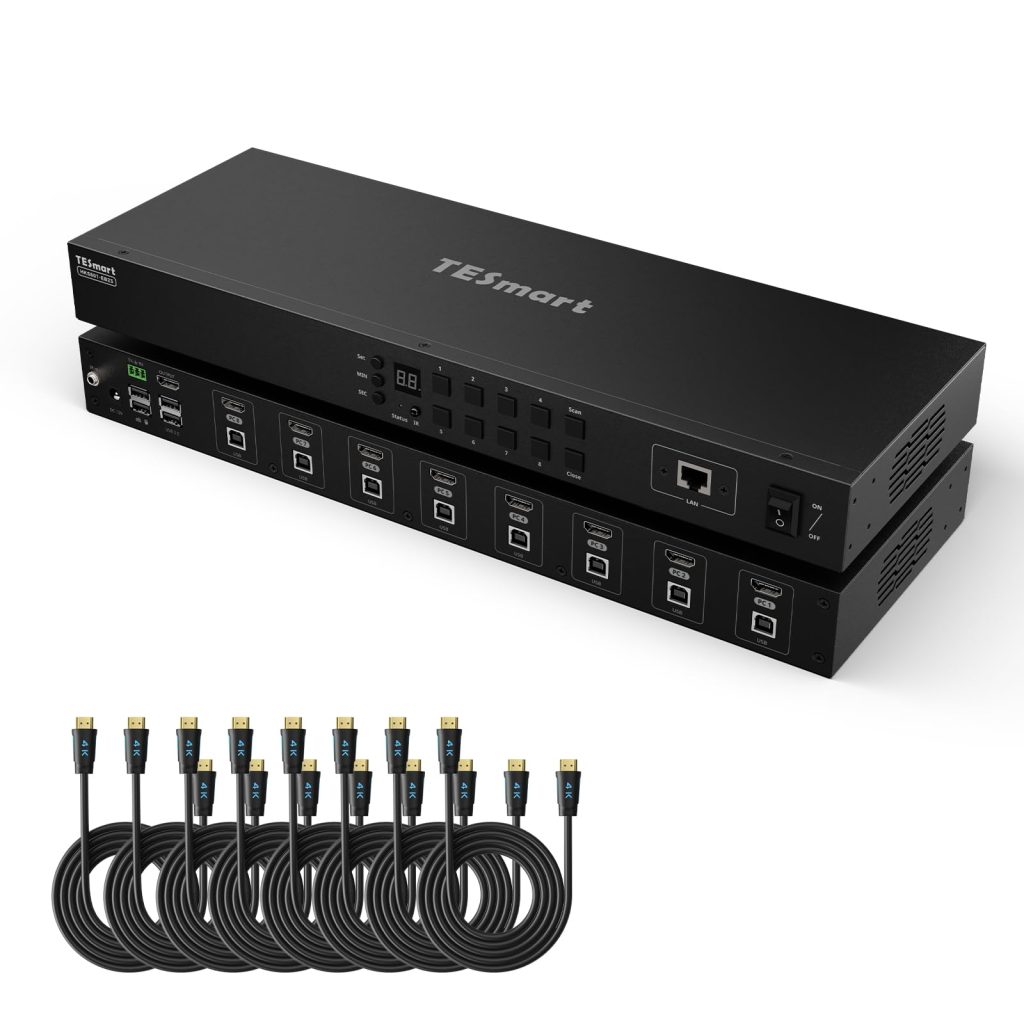
Managing eight computers from a single keyboard, monitor, and mouse is a common need in server rooms, labs, and broadcast racks. The TESmart 8X1 HDMI KVM Switch aims to fill that role with a 1U rackmount chassis, 4K at 30Hz support, and a mix of local and remote control options. It’s a niche product, but for the right environment, it can simplify a cluttered setup.
In real-world use, this switch sits between eight HDMI sources and one display. Each connected computer needs its own USB link for keyboard and mouse, and the included eight 5-foot KVM cables handle both HDMI and USB in a single run. That’s convenient, though the 5-foot length limits how far apart your systems can be. In a rack, that’s usually fine; on a desk with towers spread out, you may need extensions.
Switching between ports can be done in several ways: front-panel buttons, hotkeys, the included IR remote, or over the network via the LAN port. The hotkey commands are standard and work without additional software, which is a plus for mixed-OS environments. The IR remote is handy for quick changes from across the room, but it requires line of sight and the remote itself feels basic. The LAN port enables IP control, allowing you to switch ports from a web browser or integrate with automation systems. For remote management, this is a significant advantage over purely manual switches.
For integration with control systems, the RS232 port is a welcome inclusion. It’s a serial interface that lets you send commands from a third-party controller, such as Crestron or Extron. That’s a feature usually found on more expensive KVM switches, so its presence here is notable. However, the command set is not extensively documented; you’ll need to dig through the manual or contact support for details.
The EDID emulator is another enterprise-oriented feature. It ensures that each connected computer sees a consistent display capability, even when the switch is not focused on that port. This prevents resolution changes or blank screens when switching, which can be a nuisance in multi-system setups. In practice, it works as intended, though we couldn’t verify compatibility with every possible display and computer combination.
Auto-scan is available for monitoring multiple systems in sequence. The scan interval is configurable, but the default is a bit slow for some users. It’s useful for dashboards or occasional checks, but not for real-time monitoring.
Build quality is decent: the metal chassis feels sturdy and rack ears are included. The front panel has LEDs for port status, which are bright but not distracting. The unit runs warm but not hot, and there’s no fan, so it’s silent. That’s a plus in quiet environments.
One limitation is the 4K at 30Hz. Many modern displays and graphics cards support 4K at 60Hz, and at 30Hz, motion looks less smooth and mouse movement can feel laggy. For static content or server management, it’s acceptable, but for video editing or gaming, it’s a compromise. If you need 4K at 60Hz, you’ll have to look at more expensive KVM switches, such as those from Aten or IOGear, which typically cost significantly more. This TESmart model is a budget-friendly alternative for those who can live with 30Hz.
Another trade-off is USB 2.0. While fine for keyboards, mice, and basic storage, it won’t support high-speed USB 3.0 devices like external SSDs or high-resolution webcams. If you need to share USB 3.0 peripherals, you’ll need a separate USB switch or a different KVM altogether.
Who is this for? It’s suitable for IT administrators managing a rack of servers, lab technicians with multiple test systems, or home lab enthusiasts who want remote access without paying enterprise prices. It’s not for gamers or creative professionals who need 4K at 60Hz or USB 3.0 speeds. Also, if you only need to switch between two computers, a simpler 2-port KVM would be more cost-effective.
In summary, the TESmart 8X1 HDMI KVM Switch offers a practical set of features for its price point, with remote control options that are rare in this segment. The 4K at 30Hz and USB 2.0 limitations are worth considering, but for many server and lab applications, they won’t be deal-breakers. It’s a solid choice for those who need to consolidate control of multiple systems without breaking the bank.