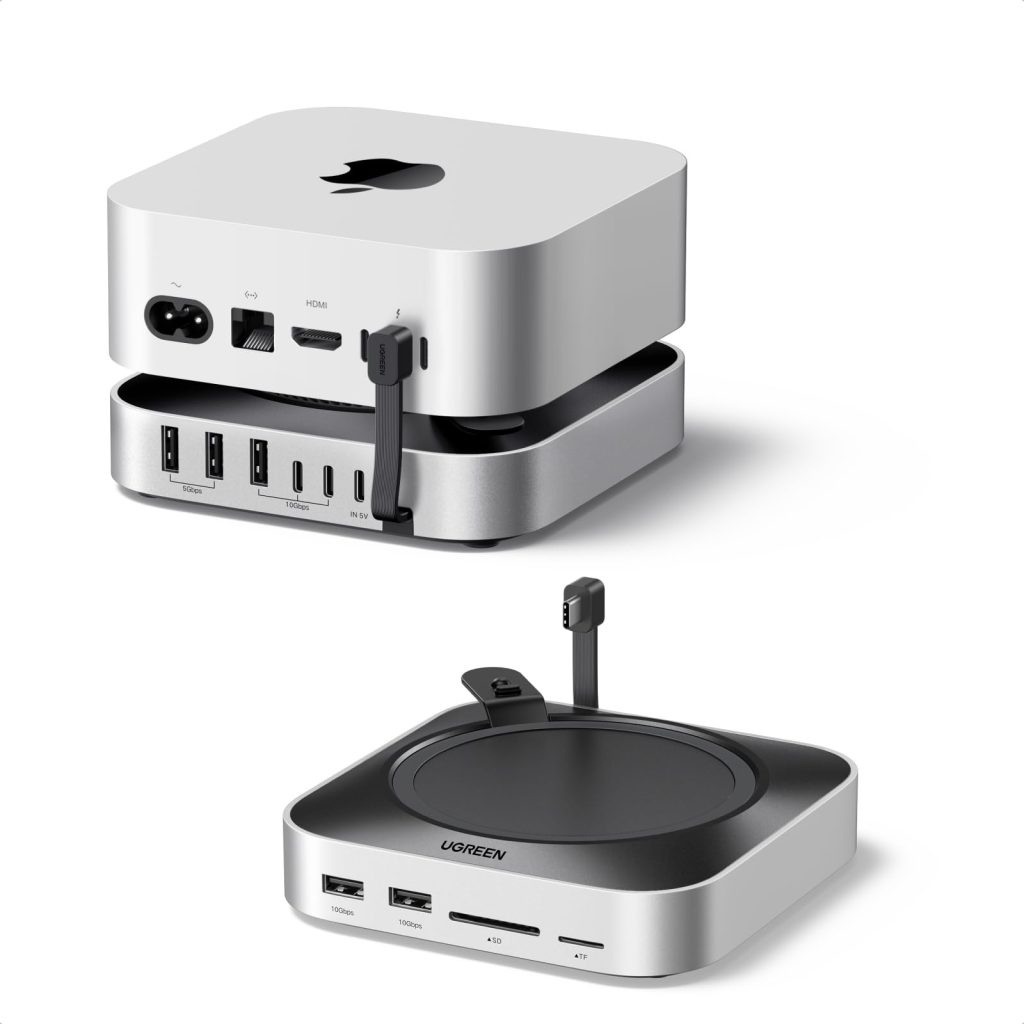
If you own an M-series Mac mini, you know the drill: the machine itself is tiny, but the moment you plug in an external drive, a couple of monitors, and an SD card reader, your desk turns into a nest of cables and dongles. UGREEN’s Mac mini Dock & Stand with NVMe SSD Enclosure aims to fix that by combining a vertical stand, a port hub, and a solid-state drive enclosure into one accessory. It’s a clever idea, but like any multi-function device, it comes with compromises.
The dock is designed for the M6/M5 Pro/M4 Mac mini, which shares the same compact chassis as recent models. It holds the Mac mini vertically, which saves desk space and can help with cooling since the machine’s bottom vents are no longer pressed against the desk. The stand itself feels sturdy, with a weighted base and rubberized pads to keep everything in place. Installation is straightforward: you slide the Mac mini into the stand, connect the dock’s USB-C cable to one of the Mac’s Thunderbolt ports, and you’re ready to go.
On the back, you get a decent selection of ports: a USB-C data port, two USB-A 3.2 Gen 2 ports, a Gigabit Ethernet jack, and an SD/microSD card reader. There’s also an M.2 NVMe SSD slot inside the enclosure, accessible via a small panel on the bottom. The idea is that you can install an SSD (not included) and use it as fast external storage without another cable or enclosure cluttering your desk. The dock connects to the Mac via a single USB-C cable, which carries both data and power for the SSD and hub functions. It’s a tidy solution.
In practice, the dock performs well for everyday tasks. The USB-A ports are fast enough for external drives and peripherals, and the Ethernet port is a welcome addition for anyone who prefers a wired connection. The card reader is convenient for photographers, though it’s not the fastest we’ve tested—transferring a full 128GB SD card took a few minutes longer than with a dedicated reader. The NVMe enclosure is the standout feature: with a mid-range SSD, we saw read/write speeds around 900MB/s, which is plenty for photo libraries, video editing scratch disks, or Time Machine backups. It’s not as fast as a Thunderbolt 3 enclosure, but it’s also much cheaper and doesn’t require an extra power brick.
But there are trade-offs. First, the dock occupies one of the Mac mini’s Thunderbolt ports, and since the M-series Mac mini only has two (or four on the Pro), you might find yourself short on high-speed ports. The dock’s USB-C port is data-only, so you can’t use it for a display. That means if you want dual monitors, you’ll need to use the Mac’s remaining Thunderbolt port for one display and possibly the HDMI port for another—workable, but not ideal. Second, the SSD enclosure is limited to PCIe 3.0 speeds, so don’t expect to get the full performance from a high-end PCIe 4.0 drive. Third, the dock doesn’t support Thunderbolt passthrough, so you can’t daisy-chain other Thunderbolt devices. Finally, the fanless design means the SSD can get warm during sustained transfers, though we didn’t see any thermal throttling in our tests.
Compared to a dedicated Thunderbolt dock, this UGREEN unit is more affordable and integrates the SSD enclosure, but it offers fewer ports and slower overall throughput. A traditional Thunderbolt dock typically provides more USB ports, DisplayPort output, and sometimes even power delivery for a laptop. However, those docks are often bulky and require their own power supply. The UGREEN dock is best seen as a space-saving accessory for Mac mini users who want a cleaner setup without spending a fortune. It’s not for someone who needs maximum expandability or who relies on Thunderbolt daisy-chaining.
Who should buy this? If you have a base M4 Mac mini and want to add an SSD and a few ports without adding clutter, this is a sensible choice. It’s also great for users who frequently move their Mac mini between home and office, since it doubles as a stand and a hub. On the other hand, if you already own a Thunderbolt dock or need to connect multiple high-resolution displays, you might find this limiting. Power users with M5 Pro or M6 Pro Mac minis that have more ports might not need the extra hub, but the SSD enclosure could still be useful.
In summary, the UGREEN Mac mini Dock & Stand with NVMe SSD Enclosure is a practical accessory that solves a common problem for Mac mini owners. It’s not without its limitations, but for the right user, it’s a tidy and cost-effective way to expand storage and connectivity.